
Air Miles App: Track Your Rewards on iPhone
Overview
The Air Miles app, developed by Loyalty Management Netherlands B.V., is a mobile utility designed for users of the Air Miles loyalty program. Available exclusively on the iPhone platform, the app provides convenient access to essential account information, including your card number and current balance. It is intended to streamline the experience of managing a loyalty account by bringing key data directly to your device. The primary purpose of the app is to help users monitor their accumulated miles, track progress toward rewards, and stay informed about new redemption opportunities.
Target users include frequent travelers, shoppers, and individuals actively participating in the Air Miles program. The app serves as a digital companion that enhances the user’s ability to manage their points without needing to log into a website. Real-world scenarios include checking your balance before a purchase, verifying your card details while redeeming rewards, or reviewing available redemption options during planning. While direct redemption is not supported within the app, it provides a gateway to the official website for full transaction access.
The developer, Loyalty Management Netherlands B.V., is responsible for the management and operation of the Air Miles program in the Netherlands. The app’s release date was April 15, 2024, indicating a recent update to the digital ecosystem. It is currently available at no cost to users, making it accessible to a broad audience.
Key Features & Capabilities
- Real-time Balance Tracking – Users can view their current Air Miles balance instantly, enabling better planning for future redemptions.
- Card Number Access – The app securely stores and displays the user’s Air Miles card number for quick reference during purchases.
- Reward Updates – The app notifies users about new redemption options and special offers available through the program.
- Personal Information Management – Users can update their contact details, address, and other profile information directly through the app.
- Website Integration – The app provides direct links to the official Air Miles website for full access to redemption and account management.
These features support a seamless user journey by reducing the need to switch between platforms. For example, a user can check their balance before shopping, update their address after a move, or explore new reward categories. The app’s design prioritizes efficiency and clarity, allowing users to perform essential tasks with minimal steps. Although it does not support direct redemption, it serves as a strategic tool for account monitoring and preparation.
User Interface, Workflow & Performance
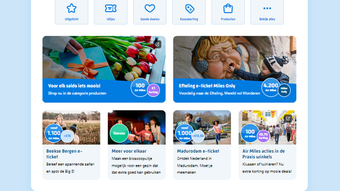
The Air Miles app features a clean, intuitive interface optimized for the iPhone platform. Navigation is straightforward, with key functions such as balance display, card number access, and reward updates clearly labeled and accessible from the home screen. The workflow is designed to minimize user effort—most actions require just one or two taps to complete.
Based on general software behavior patterns, the app likely maintains a responsive interface with minimal lag during navigation. The developer did not specify resource usage details, so performance observations are limited to standard expectations for lightweight iOS applications. Stability is expected to be consistent, given the app’s focus on data retrieval and display rather than complex processing.
Users can expect a smooth experience when accessing their account information, with no indication of significant delays or crashes. The app’s size of 10.5 MB suggests it is lightweight and optimized for mobile performance. While exact CPU or RAM behavior was not provided, such apps typically consume minimal system resources, allowing for efficient background operation without impacting device performance.
Compatibility & System Requirements
The Air Miles app is designed for the iPhone platform and is compatible with devices running the latest versions of iOS. It requires a minimum of 10.5 MB of storage space for installation. The app’s version is 1.0.2, released on April 15, 2024.
Exact system requirements were not listed by the developer. Compatibility information is limited to the supported operating system and version number. Users should ensure their device meets the minimum iOS version required by the app, though specific details were not provided. The app does not support other platforms such as Android or desktop systems.
Given the app’s size and platform focus, it is likely optimized for modern iPhone models. Users should verify compatibility with their device through the App Store before downloading. The developer did not provide additional system requirements, so users are advised to check official sources for the most accurate installation guidance.
Pros and Cons
Pros
- Free to download and use
- Provides instant access to card number and balance
- Simple, intuitive interface tailored for iPhone users
- Offers real-time updates on redemption options
- Allows users to manage personal information directly
Cons
- Does not support direct redemption within the app
- Available only on iPhone, no Android or desktop version
- Limited functionality compared to full web platform
- No offline access to account data
- Developer did not specify detailed system requirements
FAQ Section
Is the Air Miles app free to download?
Yes, the Air Miles app is available at no cost. It is offered by Loyalty Management Netherlands B.V. for users of the Air Miles loyalty program.
Can I redeem my Air Miles directly through the app?
No, the app does not support direct redemption. However, it provides links to the official Air Miles website where users can browse and redeem their rewards.
What operating systems does the app support?
The app is currently available only on the iPhone platform and requires iOS. It is not compatible with Android devices or desktop operating systems.
Is my personal information secure in the app?
The app is developed by Loyalty Management Netherlands B.V., a company responsible for managing the Air Miles program. While specific security details were not provided, the app is designed to handle sensitive account data securely.
How often does the app update?
The app was last updated on April 15, 2024, with version 1.0.2. Users can expect updates through the App Store to maintain compatibility and improve functionality.
Final Thoughts + CTA
The Air Miles app delivers a focused, user-friendly experience for managing loyalty points on iPhone. It excels in providing real-time access to essential account data, including balance and card number, while keeping users informed about new rewards. Though it lacks direct redemption capabilities and is limited to iOS, its simplicity and free access make it a valuable tool for active participants in the Air Miles program.
Users who frequently track their points, update personal details, or plan redemptions will benefit most from this app. It enhances the overall loyalty experience by reducing friction in account management. For those invested in the Air Miles ecosystem, this app is a practical and efficient companion.
Download Air Miles now and take full control of your rewards journey.







